
Sales Inbox
The Sales Inbox shows imported orders, explains why stock has or has not been deducted, and gives you the safe next action for each sale.
Status checks
Each sale line is checked in three stages. A sale is only fully complete when all three checks are clear.
| Check | Meaning | What to do if it fails |
|---|---|---|
| Listing | TrueSKU has found or created a listing record that matches the sale line SKU/code. | Create the missing listing from the Sales Inbox, or check that the sale SKU/code is correct. |
| SKU | The listing is linked to an internal SKU in TrueSKU. | Open the listing and link it to the correct SKU. |
| Stock | Stock has been deducted, or the line has been deliberately marked as already accounted for. | If Listing and SKU are complete, wait for the stock processor or use the manual action where appropriate. |
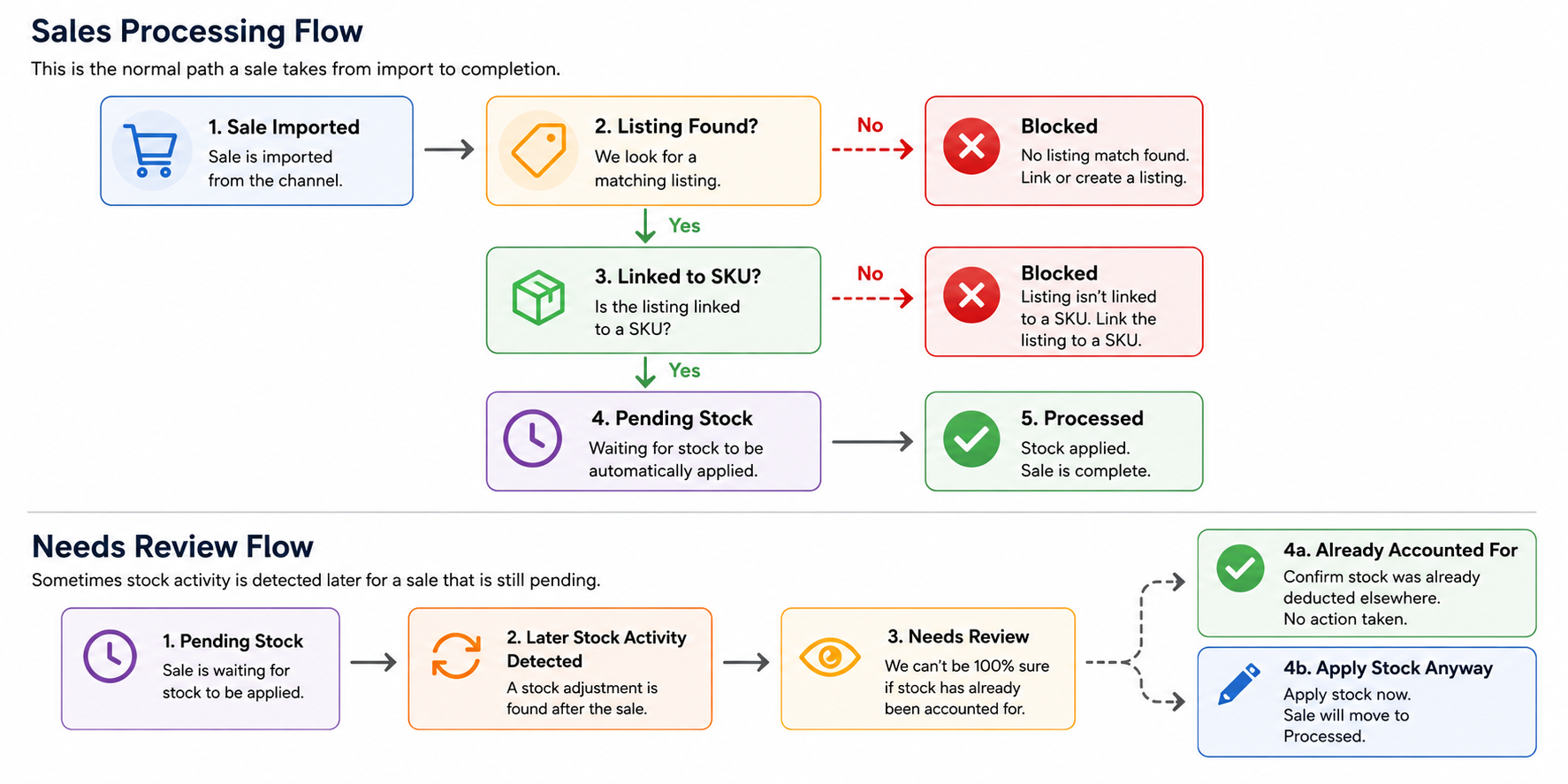
Sales processing flow
This diagram shows the normal automatic route, plus the manual Needs Review route used when TrueSKU detects later stock activity.
Status cards and filters
The cards at the top of the Sales Inbox are clickable. They show the same states as the Status filter.
| Status | Meaning | Typical action |
|---|---|---|
| Blocked | At least one unapplied line has no listing match or no SKU link. | Create missing listings and link them to SKUs. |
| Repair mapping | Stock was already applied, but the current listing or SKU link is now missing. | Repair the mapping for audit clarity. Do not deduct stock again. |
| Pending stock | Listing and SKU checks pass, but stock has not been applied yet. | Usually wait for the automatic processor. You can also run Apply eligible pending stock. |
| Needs review | TrueSKU found later stock activity after the sale date, so automatic deduction is paused. | Choose Already Accounted For or Apply Stock Anyway on the sale line. |
| Processed | Stock has been applied, or the sale line has been intentionally marked as accounted for. | No stock action needed. |
Create missing listings
Create missing listings creates listing records for sale lines that do not yet have a listing match. This makes it possible to link the sale to a SKU.
Needs Review decisions
Needs Review protects against double-deducting older sales after a stock take or manual correction has already happened.
Use this when the later stock movement or stock take already included the sale. TrueSKU records the line as dealt with but creates no new stock movement.
Use this when you are sure the later stock activity did not include this sale. TrueSKU applies the sale stock movement and moves the line to Processed.
All help and contents
To browse all TrueSKU help pages, go back to the Quick start / contents page. The left-hand menu links to the main help sections.