
Choosing your workflow
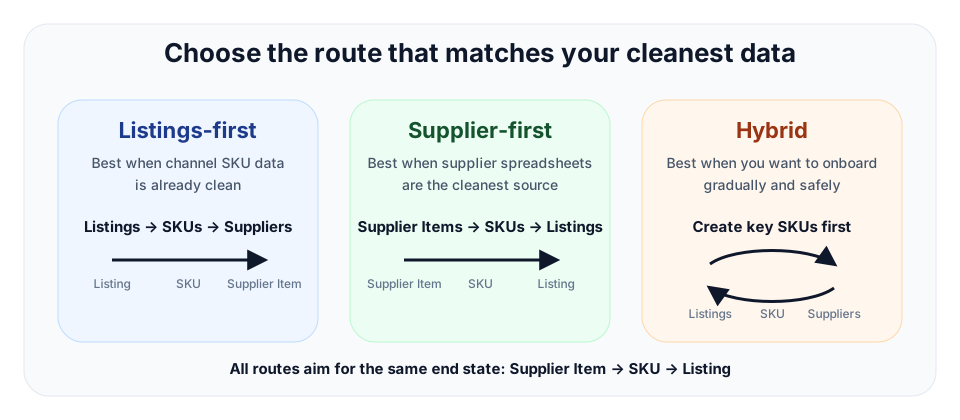
TrueSKU supports more than one valid setup route. Pick the route that matches where your cleanest data already lives.
The three records
| Record | Use it for | Required for |
|---|---|---|
| Listing | Marketplace/channel saleable item. | Outbound stock sync when linked to a SKU. |
| SKU | Internal stock record and stock truth. | Stock control, sync, purchase receiving, bundles and audit. |
| Supplier Item | Supplier catalogue/purchase option. | Purchase order receiving when linked to a SKU. |
Listings-first
Use this when your channel listings already have clean SKU/custom label data. Import or mirror listings, create or link SKUs from listings, then add supplier items for purchasing.
Supplier-first
Use this when supplier spreadsheets are cleaner than marketplace data. Import supplier items, create SKUs from supplier items, then link channel listings to those SKUs. This is a good fit for businesses that already manage stock around supplier codes.
Hybrid
Use this when neither source is perfect. Start with the products that matter most, create SKUs, link listings, then add supplier items and purchase options over time.
Spreadsheet-heavy onboarding
If your existing supplier spreadsheets are the cleanest source of product data, start supplier-first. Import supplier items, create SKUs from those supplier items, then link listings to the created SKUs. This is a normal TrueSKU workflow, not a workaround.
Minimum links for common outcomes
| Outcome | Minimum link needed | Why |
|---|---|---|
| Outbound stock sync | Listing → SKU | The listing needs a SKU to supply the quantity. |
| Purchase order receiving updates stock | Supplier Item → SKU | The received supplier item needs to know which SKU to increase. |
| Full closed-loop stock control | Supplier Item → SKU → Listing | Purchasing, stock ledger and channel sync are all connected. |